Integrating NI-DAQ, LabVIEW & TestStand for a Unified Automated Test System
A modern automated test system works best when hardware, measurement software, and test execution tools operate in complete sync. National Instruments (NI) enables this through its tightly connected ecosystem NI-DAQ, LabVIEW, and TestStand delivering an end-to-end pathway for data acquisition, measurement, control, validation, and automated test management.
Below is a clear breakdown of how each layer contributes and why their integr ation results in a powerful, scalable test architecture.
1. LabVIEW — Graphical Development Platform for Measurement & Control
LabVIEW (Laboratory Virtual Instrument Engineering Workbench) is NI’s graphical programming environment designed for data acquisition, measurement analysis, and control system development.
It acts as the software engine that communicates with hardware, processes sensor signals, and drives control outputs.
Key Roles of LabVIEW
- Build measurement and control algorithms using graphical dataflow programming
- Interface with NI hardware using NI-DAQmx drivers
- Implement closed-loop control, real-time signal monitoring, and data logging
- Create reusable Virtual Instruments (VIs) for modular test logic
In short: LabVIEW is the measurement and control layer of the test system.
2. NI-DAQ — Data Acquisition Hardware Layer
NI-DAQ represents NI’s portfolio of data acquisition hardware and the supporting driver architecture. It connects real-world signals (voltage, current, sensors, digital states) directly to the software environment.
Key Roles of NI-DAQ
- Acquire analog and digital signals (voltage, current, temperature, pressure, etc.)
- Generate analog/digital outputs to control actuators and external devices
- Communicate with LabVIEW using the NI-DAQmx API
- Provide high-precision timing, synchronization, and triggering
In short: NI-DAQ is the hardware interface layer, bridging physical signals with software logic.
3. TestStand — Test Sequencing, Execution & Management
NI TestStand is a dedicated test management framework used to orchestrate automated test sequences for validation, characterization, or production environments.
It provides a centralized system to execute, monitor, and report test operations across hardware and software layers.
Key Roles of TestStand
- Define and execute automated test sequences
- Manage test flow, branching logic, operator interfaces, and reporting
- Call LabVIEW VIs to perform hardware control and data acquisition
- Support batch testing, multi-UUT workflows, and database logging
In short: TestStand is the orchestration layer, coordinating all test activities above LabVIEW.
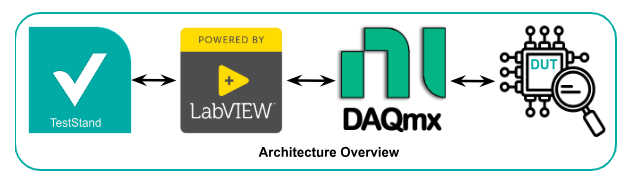
Combined Advantage — Why Integrating NI-DAQ, LabVIEW & TestStand Matters
When all three tools operate together, organizations get a unified and modular automated test ecosystem:
|
Aspect |
NI-DAQ |
LabVIEW |
TestStand |
Combined Benefits |
|
Hardware Control |
Physical signal interface |
Hardware driver communication |
Test-level coordination |
End-to-end link from hardware to test plan |
|
Application Focus |
I/O & timing |
Measurement logic & control |
Test execution & reporting |
Unified workflow from data to decision |
|
Development Scope |
Hardware setup |
VI-based software design |
Sequence & automation |
Scalable system for R&D and production |
|
Reusability |
Channel configuration |
Reusable VIs |
Reusable test sequences |
Easy replication across multiple systems |
Core Integration Benefits
- Seamless Data Flow: Direct, lossless communication from DAQ hardware to LabVIEW logic to TestStand sequences
- High Modularity: Update hardware, software, or sequences independently
- Faster Development: LabVIEW’s graphical programming accelerates prototyping
- Consistent Reporting: Standardized test reports via TestStand
- Scalability: Easily adapt to new sensors, instruments, or product variants
Summary
By combining NI-DAQ for hardware connectivity, LabVIEW for measurement and control, and TestStand for orchestration, organizations can build scalable, modular, and high-performance automated test systems. This unified NI ecosystem streamlines everything—from engineering development to production validation—resulting in reliable, maintainable, and future-ready test infrastructure.
FAQ’s
Q1. How do NI-DAQ, LabVIEW, and TestStand work together in an automated test system?
NI-DAQ handles data acquisition, LabVIEW manages measurement and control, and TestStand orchestrates test sequencing and reporting. Together, they create a unified and scalable automated test ecosystem.
Q2. What are the advantages of integrating LabVIEW VIs inside TestStand?
It enables modular sequence management, consistent reporting, reuse of measurement logic, and faster development for production test workflows.
Q3. Can NI-DAQmx be directly controlled through LabVIEW?
Yes. LabVIEW communicates with NI-DAQ hardware through NI-DAQmx drivers, enabling real-time acquisition, signal generation, and hardware control.
Q4. Does Unilogic implement TestStand-based test systems?
Yes. Unilogic specializes in building automated test systems using TestStand, LabVIEW, NI-DAQ, NI PXI, and custom frameworks for R&D and production.
Q5. Is this architecture suitable for high-volume manufacturing?
Absolutely. The NI test ecosystem enables multi-UUT testing, parallel sequences, fast execution, and scalable deployment for mass manufacturing testing.