Securing LabVIEW Applications: Data Security, Encryption & System Integrity
In today’s connected industrial environments, data security and software integrity are no longer optional. They are essential for maintaining reliability, compliance, and trust — especially in systems built using LabVIEW for test automation, data acquisition, EV testing, and production workflows.
As a team that provides LabVIEW Consulting Services, LabVIEW Automation Services, and LabVIEW System Integration across industries like EV, medical devices, and semiconductor testing, we follow a multi-layered security framework that protects every stage of development — from source code to runtime executables.
Our approach includes secure source code management, encrypted configuration handling, controlled application licensing, and safe remote access for LabVIEW debugging services, LabVIEW support services, and long-term system maintenance.
1. Source Code Security with Gitea (Version Control for LabVIEW Development)
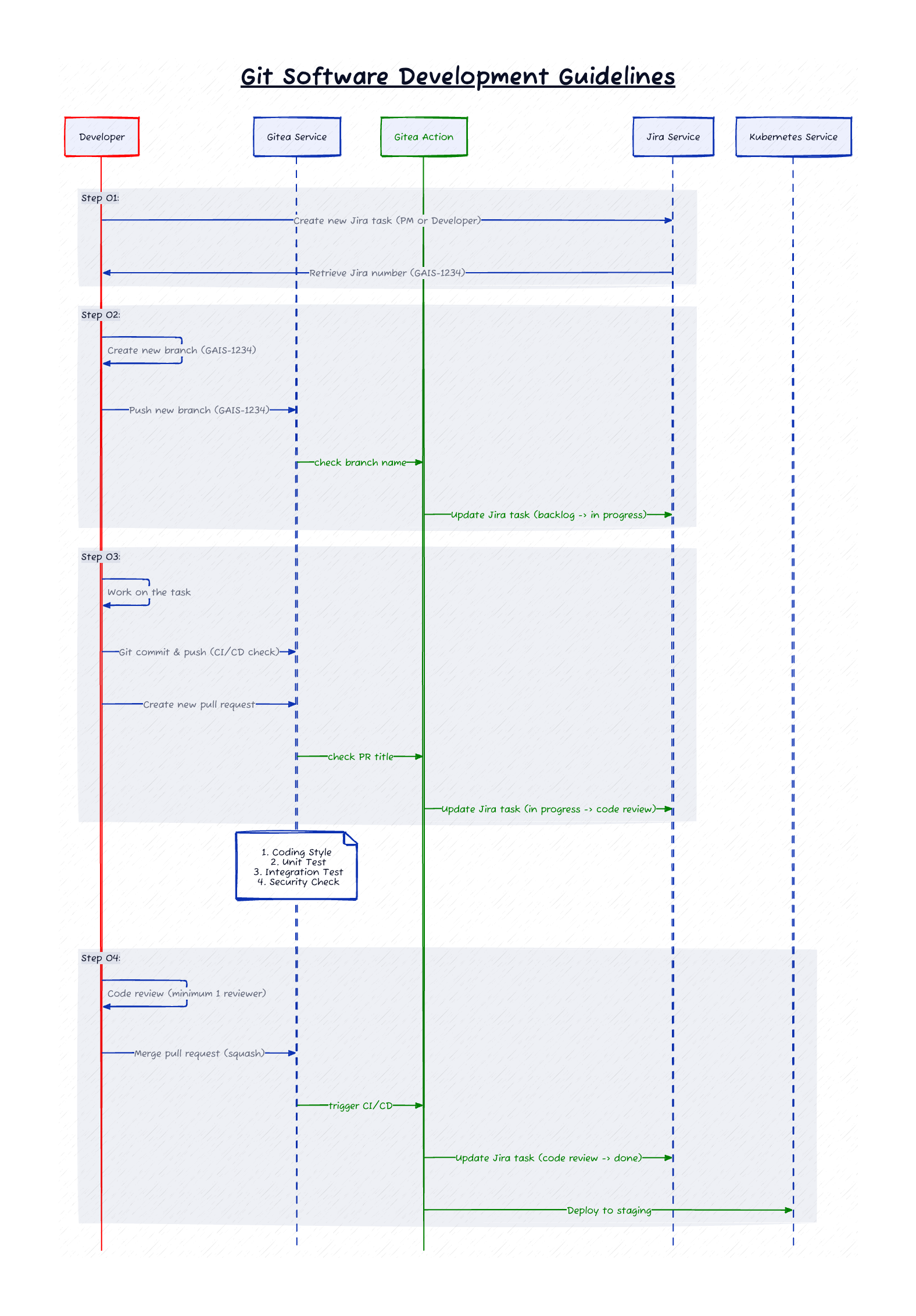
For all our LabVIEW development services, we manage project repositories using Gitea, a self-hosted Git-based system that gives us complete control over the LabVIEW codebase.
Why Gitea?
It aligns perfectly with customers who require secure LabVIEW outsourcing, IP protection, and isolated network environments.
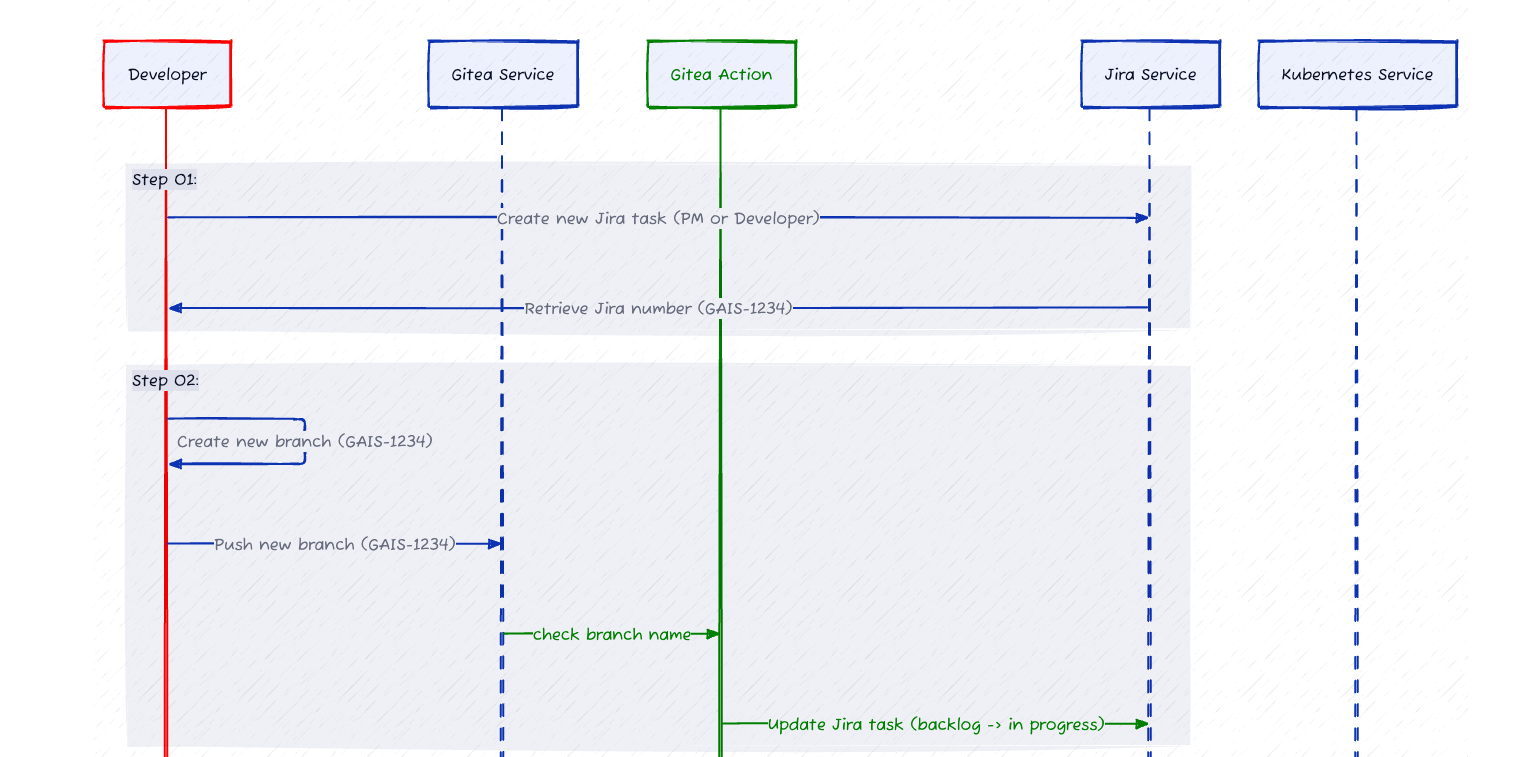
Security Features Implemented
Self-Hosted Repositories
All LabVIEW project repositories are hosted inside our internal network, behind enterprise-grade firewalls — eliminating third-party exposure.
Controlled User Authentication
Access is permission-based (Read / Write / Admin), ensuring each LabVIEW developer or team member interacts only with what they need.
Encrypted Communication
Gitea communicates via HTTPS and SSH, securing all commits, pull requests, and repository actions.
Branch Protection
Critical branches (main, release, production) are protected to prevent accidental or unauthorized commits.
Complete Audit Trail
Every change is versioned, timestamped, and mapped to the responsible LabVIEW programmer, ensuring traceability and compliance.
Redundancy & Backup
Automated backups ensure quick recovery — crucial for long-term LabVIEW integration services and ATE systems.
This ensures each LabVIEW application we build — whether for EV testing, medical device validation, battery testing, or ATE development — is secure and version-stable.
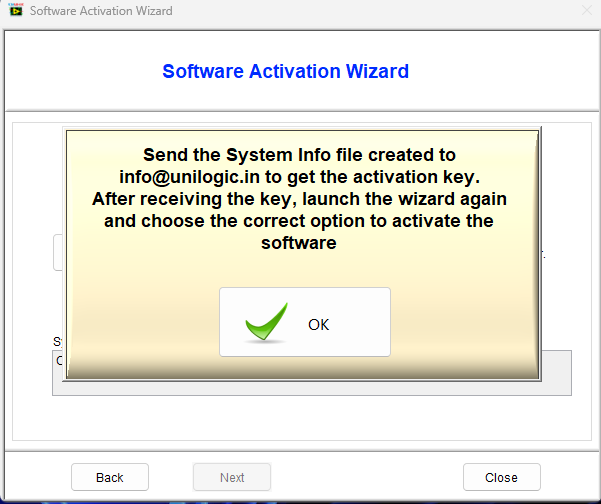
2. Application Licensing & Execution Control
When a LabVIEW application is built into an executable, licensing becomes the first defense against unauthorized use — particularly important in outsourced or distributed test systems.
Key Licensing Measures
Hardware-Locked Licenses
Each license binds to system identifiers like MAC address or motherboard ID — preventing redistribution.
Runtime License Validation
During execution, the application checks its license validity and blocks unauthorized access.
This protects intellectual property for customers who hire us as Remote LabVIEW Developers, Certified LabVIEW Developers, or LabVIEW consultants for automation.
3. Configuration File Protection & Role-Based Access
LabVIEW applications rely heavily on configuration files (INI, JSON, XML, DB tables).
A single unauthorized change can impact performance, accuracy, or safety.
Our Protection Framework
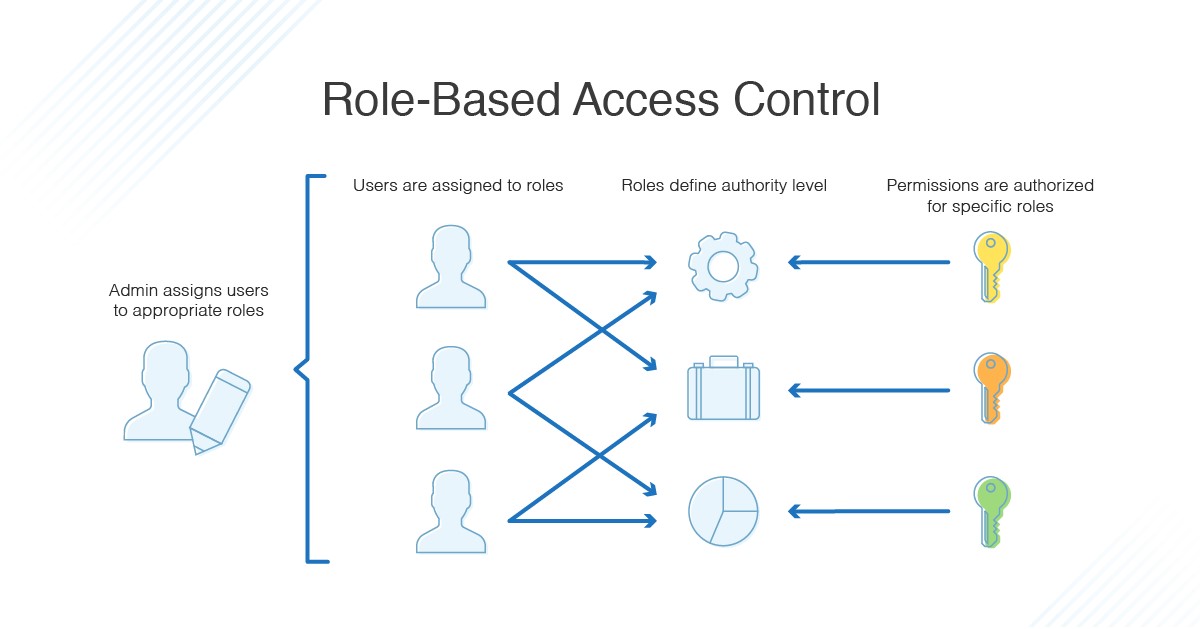
Role-Based Access Control (RBAC)
Different user types are defined:
- Operators – Run tests, view results
- Engineers – Modify authorized parameters
- Administrators – Full configuration control
Encrypted Sensitive Fields: Configuration values like device IDs, passwords, calibration constants are encrypted and only decrypted in-memory.
File Integrity Checks: SHA256-based checks validate that config files have not been tampered with.
Audit Logging
Every change is recorded with timestamp and user attribution.
These practices are standard across our LabVIEW ATE development, LabVIEW real-time, LabVIEW FPGA, and LabVIEW TestStand integration projects.
4. Best Practices for LabVIEW Application Security
We follow and recommend the following for all LabVIEW environments:
- Password-protect critical VIs and libraries
- Remove block diagrams in distributed executables
- Digitally sign installers and executables
Perform periodic LabVIEW Runtime and NI driver updates
5. Secure Remote Access for Support & Debugging
Remote access is necessary for LabVIEW debugging services, support, and ATE maintenance — especially for offshore deployments.
Our Remote Access Framework
Trusted Industry-Standard Tools
TeamViewer, AnyDesk, Chrome Remote Desktop.
On-Demand Customer Approval
No session starts without explicit customer permission.
Flexible Access Modes
Including Microsoft Teams screen-sharing for lighter debugging.
Session Security
Password-protected, monitored, and logged.
This ensures safe, secure access to remote EV test rigs, medical validation stations, battery ATEs, semiconductor benches, and R&D automation setups.
Conclusion
Securing a LabVIEW application requires more than password locks or encrypted files — it needs a comprehensive security ecosystem.
Our integrated approach blends:
- Gitea-based version control
- Application licensing
- Encrypted configuration management
- Role-based access control
- Secure remote maintenance
With this framework, we deliver secure, reliable, and compliant solutions across industries — supporting customers in EV testing, medical devices, batteries, semiconductors, R&D automation, and end-of-line production.
Whether you're looking to hire a LabVIEW expert, outsource development, or enhance automation, our security-first methodology ensures your systems stay protected, traceable, and future-ready.
FAQ's
1. How do you secure LabVIEW applications used in industrial automation?
We secure LabVIEW applications through source code protection (Gitea), encrypted configuration files, hardware-bound licensing, role-based access, and secure remote access for debugging and maintenance.
2. What are the best practices to protect LabVIEW executables?
Best practices include removing block diagrams, password-protecting critical VIs, digitally signing installers, enforcing role-based access, and regularly updating LabVIEW Runtime and NI drivers.
3. How do you prevent unauthorized use of LabVIEW software?
We use hardware-locked licensing, runtime license verification, encrypted configuration storage, and restricted access to executables to prevent duplication or unauthorized usage.
4. Do you provide secure remote LabVIEW debugging and support?
Yes. We offer secure LabVIEW support and remote debugging via TeamViewer, AnyDesk, and Teams — always with customer approval and encrypted access protocols.
5. Can these security measures be applied to EV testing, medical devices, or ATE systems?
Absolutely. Our security framework is designed for EV battery testing, semiconductor validation, MedTech automation, and production ATE systems requiring high reliability and auditability.
6. Who can help me secure my LabVIEW application?
Unilogic Technologies provides end-to-end LabVIEW consulting, development, debugging, and security-hardening services for industrial automation environments.